Wednesday, September 23, 2009

Animate simulations in python

I've recently written a nice short code in python to animate the results (plots) of a simulation using chaco (part of Enthought ETS)
It is not actually very difficult, but i've just made up this one for myself, and it also has some cool features, so i thought i'd share it with others may as well benefit from it.

  • This if useful for you if you ever do coding in python and need to plot somethings which may change with time. Example lets say you are plotting the evolution of temperature over a rod with time or solving a 1D Euler equation (say shock tube problem)
  • This code provides a simple function to do it easily.
  • You can play-pause the code (simulation) at any time.
  • You can zoom-pan theplot
  • You can plot multiple subplots in a single window (Example the velocity, density and pressure in a shock tube problem)
  • You can edit axis labels, font, grids using gui
  • You can save the plots
Usage:
This is the only function defined in the file  you need to know:
def animate(func, delay=0.1, total_time=0.0, time_factor=1.0, size=(800, 600), title='Plot'):
    '''function to animate the values returned by a function
   
    func : function which returns a tuple of x,y values to animate on each call
        x is shape (N,), y is shape (N,) or (p,N), N is number of points, p is number of plots (properties)
    delay is the time interval in which to call the func after the previous func has returned(seconds)
    total_time is the time at which to stop the animation
            animation will stop when total_time > self.time / time_factor
            total_time <= 0 will continue indefinitely
    time_factor is the time to display as title (displayed_time=time/time_factor)
    In the plot window:
        pressing 'p' key will toggle animation play-pause
        pressing Ctrl-S will open a dialog to save a rendering of the plot
        pressing 'ESC' will reset the zoom level of the plot
        double clicking on some parts of the plot allows you to edit them in a gui,
            (axis titles, grids, ticks etc)
        if the window becomes unresponsive, pause the animation for a while
    '''


The docstring explains most of the things you need to know.
Here's how you could use it:
First we see how to animate a single plot (A moving sine wave in this case)
from animate import animate
from numpy import linspace, sin
x = linspace(-10, 10, 101)
i = 0.0
def get_data():
    global i
    i += 0.1
    return x + i, sin(x + i)
animate(func=get_data)

The above code snippet will generate a nice moving animation window. Here's a plot from the same


Plotting multiple values is just as simple. You only need to pass on a tuple of the y values:
from animate import animate
from numpy import linspace, sin, cos
x = linspace(-10, 10, 101)
i = 0.0
def get_data2():
    global i

    i += 0.1
    return x + i, (1 / (1 + x ** 2), sin(x + i), cos(x + i), sin(x + i), cos(x + i),)

animate(func=get_data2)
Here's a plot from the above snippet:

As you can see i have tried to make it as easy as possible without losing out on functionality.

Requirements:
To run this you will need the Enthought tool suite ETS (only traits with wx backend and chaco are required)
Hope this is useful for someone.
You can get the code animate.py from here that is:
http://home.iitb.ac.in/%7Epankajp/web/downloads/animate.py

Friday, September 18, 2009

cutie kitten


cutie kitten, originally uploaded by pankaj86.
Such a lovely pair of kitten.
So much contrast yet so much togetherness.
Friendship knows no barriers.
Hope men could learn.

(Courtesy Suchit, this pic was taken by Suchit http://suchit-de-fundae.blogspot.com/ using his mobile cam in the mess of hostel 6)

Flickr

This is a test post from flickr, a fancy photo sharing thing.

Wednesday, September 2, 2009

No smoking

All the junta out there, listen, please STOP smoking. Ya thats right, stop smoking, stop it NOW.
FREEZE,
Now throw away that cigarette in your hand and empty you wallets of the packets.
Now repeat with me thrice
    I will not smoke
    I will not smoke
    I will not smoke
If you are feeling withdrawal symptoms, contact me, i can help you and take you to rehab. Don't worry, its not worse than dying of choked lungs and killing many others in the process. Its also better than some fanatic like me shooting your brain at point blank range just for that single smoke.

join us in the mission, spread the word
http://www.thetruth.com/

Tuesday, September 1, 2009

Blend it like Blender

Few days back this summer, i decided to be a bit creative and joined a free (as in freedom) workshop on blender in my college. I attended only a few days, but blender was really impressive. The main aim of the workshop was to teach sufficient blender to enable you to create educational content. As such it was not meant to teach character animation. So in just a few days, i learnt a lot of basics of 3D modeling. Most of the initial time was taken up in learning the interface, but i can assure you that once you learn it, it enables you to be highly productive.
So here's a sample of what i did after just 3 days of learning blender. Of course as you know what happens in life, i've never been able to spend any time on blender since then...


The blend files can be downloaded from here Blender .blend file, Textures
Hope sometime i do get time to learn all the cool features of blender

Tuesday, August 25, 2009

back on my feet

Yahoo,
Today i am back on my feet. I walked on my own two feet for the first time in a month. There was still some swelling and pain in the feet, which has subsided enough that i walked to lectures today without the crutches. It feels great. Thought my gait is still awkward, and it still pains somewhat. I found out that my fracture which was at the base of the 5th metatarsal of the left foot, is also known as jones fracture, and takes longer time to heal. Hopefully i'd be jumping and dancing soon :-)
Today we also had two quizzes (a better name for class tests) for vibrations course and aircraft design lab. I should say i didn't do much good in both, but then its a routine for me :-)

Saturday, August 22, 2009

eclipse+ for python (pydev)

This semester i have taken a course in particle methods for fluid flow, whose instructor is a big fan of python, and has written large applications in python. So most of my classmates have indeed chosen to use python for the assignments. As they mostly use MS Windows, it is easier to install some python bundle such as EPD or python(x,y). I'd like to recommend python(x,y) for windows users. Though i myself don't use windows (i use Fedora 11 x64 fyi), i did try python(x,y) at my home this summer. (I know epd since much before that). The only reason for this is that python(x,y) includes eclipse with pydev, and it make much more sense to use an ide in the learning phase than using the silly notepad on windows (or any other advanced notepad). For those who are beginning afresh, here are a few clues why you should use an ide.

  • Code formatting is easily performed in pydev. Try commenting out a 20 line function your editor. (pydev hint: source->comment menu)
  • Syntax checking: You don't need to run you module to find out that you missed a semicolon after an if statement, the annotations in the editor will help you. Many more annotations to guide you to catch errors.
  • Code completion: Do you remember if the function inverse tan (arc tan) in math is called arctan or atan? (pydev hint: try math. and check if its arctan or atan)
    Do you remember the arguments of the asarray function of numpy or whether it makes a copy of the array? (pydev hint: check the documentation by hovering the mouse on the function)
  • Refactoring: Though pydev does not have the awsome refactoring capabilities of the statically typed languages (its difficult in python) it can still rename attributes and methods across modules with sufficient accuracy.
  • Templates: Do you find yourself bored typing the bolierplate code for classes or unittests or new modules? The templates are you friends. Example the new pydev module dialog box will help you easily create boilerplate code for classes and unittests. Typing 'main' in the editor will complete it to "if __name__ == '__main__':" block
  • Debugger: This cannot be emphasised enough. If you are not using a debugger, you have not been coding enough. It simplifies the task of locating the errors in a program. You can pause, continue, step through the code and check the values of any variable defined in the program. You can create conditional breakpoints and watch arbitrary expressions. Hovering over any attribute displays its value, selecting an expression displays its values. You can also switch to any frame. The debugger is probably the biggest benefit of using an ide like pydev.
Ok so all this was just to make programming beginners have a look at pydev ide. If you find anything unclear or want a short guide to do something please leave your comments and i'll try to help if possible.
In future i'd like to post a short note on beginners use of pydev and the common tasks you need to know. Tell me if you'd like to have it soon rather than later

conclude yourself

A few days back i posted about my fractured leg. Now i have the plaster of Paris on my leg removed. I'm so rejoiced. Anyway, if you did read my previous post, its time for my theory to be put to test. So if you are in India (more specifically Mumbai) then check out the status of the rains. And if my theory indeed turns out to be correct, please don't mind for me holding out the monsoons :-)

Sunday, July 26, 2009

new sem

Once in a while, there come moments which jolt you and wake you up from your dreamland into reality, and you realise the true worth of life and regret all the moments you lost to your inertia to do things as you want. Now few days back i experienced such a thing. Though a fracture is not really a BIG deal, its still a pretty big deal.
Ok so i've fractured the base of my 5th MT (metatarsal) of the left leg (simply put, my foot). Hopping around in crutches is not good, especially in the rain. Actually i had a hypothesis, it rained so less this year just to protect me from getting wet in the rain (you know, the plaster of Paris cast on my leg shudn't get wet, and with crutches in my hands i cant even hold an umbrella). Anyway, one of the predictions of this theory is that it will start raining well again when the cast from my leg goes away. Hope the theory is really correct :-)
This has really been a life changing experience for me. I've really found out my true friends, who'd go to great lengths to make me feel comfortable. Separated the wheat from the chaff :-) Also i have begun to appreciate life much more than before. Too bad it take such a thing to wake us up to reality...

Wednesday, February 25, 2009

Phoenix is an open hardware (circuit layout freely available) started by Inter University Accelerator Centre, with the objective of improving the laboratory facilities at Indian Universities, and growing with the support of the user community. Basically it is an electronic kit interfaced with a computer which has the following features:

Hardware Features
  • 4 Analog Inputs (10 bit resolution)
  • 1 Analog Output ( 8 bit)
  • 4 Digital Inputs
  • 4 Digital Outputs
  • Frequency Counter
  • Square wave generator
  • Constant Current Source (1 mA)
  • 2 Inverting Amplifiers (gain set plugin resistors)
  • 1 Non-inverting Amplifier
  • 2 Level Shifting Amplifiers
  • RS232 / USB interface
  • ATmega16 micro-controller
Basically its design use was as a helper for performing educational/scientific experiment though is can be used for many things only bounded by your imagination. Phoenix provides Analog and Digital Input/Output capabilities to a computer through the sockets on the top panel. Experiments are designed utilizing these I/O capabilities and suitable sensor elements to convert physical parameters into voltage signals. The program running on the micro-controller makes the measurements as per the commands send from the PC through RS232 or USB links. Users can access all these features by calling functions from a Python library. Python language is chosen due to its simplicity and ease of doing scientific computation and graphics using it.
The figure below shows an actual phoenix kit. Also there is a plot of diode (red LED) characteristics as obtained by connecting to the kit. Also it shows the nice monochrome lcd display which can be used to display small texts. Also visible is a snippet of the code for the same. Notice how easy it is to use, because it was mainly targetted for science students and not hor expert hackers.


Phoenix kit screenshot+photo : http://homepages.iitb.ac.in/~pankajp/web/?Things_you_may_find_useful:Electrical%2FElectronics:Phoenix_Kit&normal

Thursday, January 31, 2008

circuit simulation

I would like to share some of the things which i feel may help you if yor are interested in electrical/electronics simulation etc...
KTechlab is an opensource software which can very nicely simulate a circuit. You can drag-drop components to make a circuit and can also use it to program PIC microcontrollers. available components include normal lump circuit elements and also electronic ones like BJTs, FETs, LCDs, RAM, Serial/Parallel bus, Flip-Flops, op-amp, 555, logic-gates and many other useful ones. It can also plot the probe values as in an oscilloscope. So check it out if u wanna see some cool circuit simulation.
Screenshots at http://ktechlab.org/wiki/index.php?title=Index:Screenshots

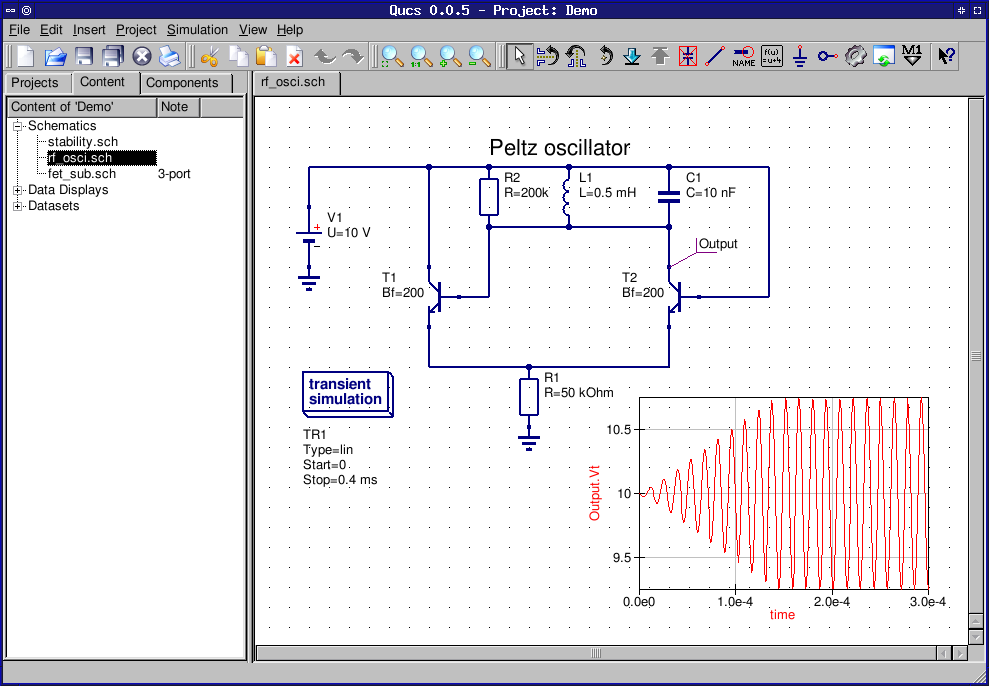
Also theres 'qucs' which is a more advanced . It has advance features which could check out yourself(as i dont know so much about electrical). However its features include a component library (find components by their no : brigdes, FETs etc) and AC/DC analysis, Transient analysis, S-Component Analysis and many more advanced things (eg u can add transmission-line as a component in ur circuit analysis and consider its effects!)
From the site : " Qucs, briefly for Quite Universal Circuit Simulator, is a circuit simulator with graphical user interface (GUI). The software aims to support all kinds of circuit simulation types, e.g. DC, AC, S-parameter, Harmonic Balance analysis, noise analysis, etc."
Screenshots at http://qucs.sourceforge.net/screenshots.html

Check the screenshots of KTechlab and QUCS


Saturday, January 5, 2008

i'm a newbee

so i'll hav to wait till i find out what how when where why about blogging.